


A customer just paid. They're relieved and paying more attention to your store than they will for days. Then most stores show them an order number and a "thanks for your order," and the moment is gone.
This guide covers 10 thank you page examples you can copy, what a good thank you page includes, and how to add offers with SellMore Post Purchase Upsell.
Thank You Page vs Post-Purchase Page vs Order Status Page
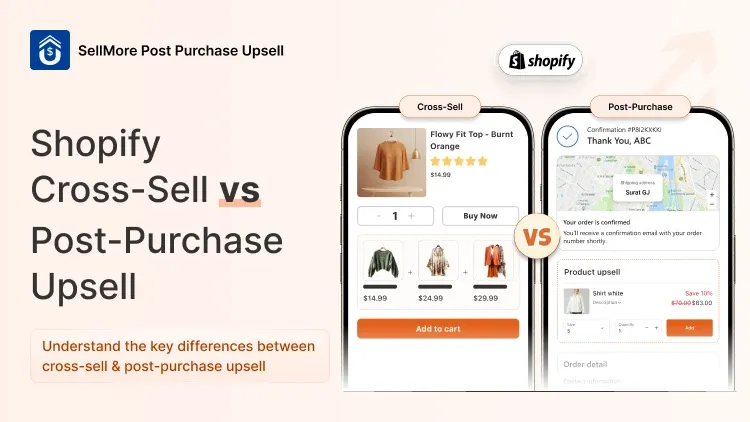
On Shopify, the Thank you page appears once, right after checkout. The Order status page is a different page: it's where customers land when they come back to check on their order. Each page after payment suits a different offer:
According to Shopify's developer documentation, customers can accept a post-purchase offer with one click, without re-entering payment details. If they decline, their order isn't affected.
The Thank you page often earns more than merchants expect. BandsCo Straps, a smartwatch strap store, earned $1,213.91 from Thank you page recommendations alone, more than its post-purchase and Order status pages combined.
10 Thank You Page Examples to Copy
1. Upsell and Cross-Sell Offers
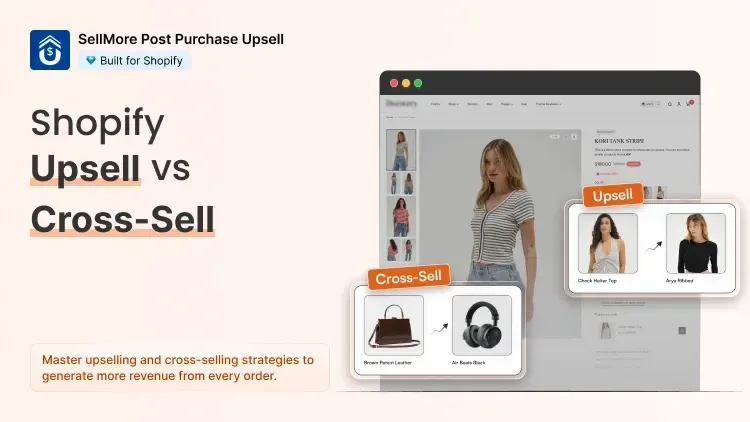
Suggest a product that goes with what the customer just bought. A customer buys $120 running shoes, and the Thank you page offers performance socks at 15% off.
With SellMore: add a Product upsell to the Thank you page and set a discount. SellMore applies it automatically, so you don't need a discount code, and you choose which orders see the offer. Customers usually accept it without re-entering payment details, and the socks are added to their original order.
2. A Limited-Time Offer
Give customers a reason to act soon, for example "Grab 20% off your next order in the next 24 hours!"
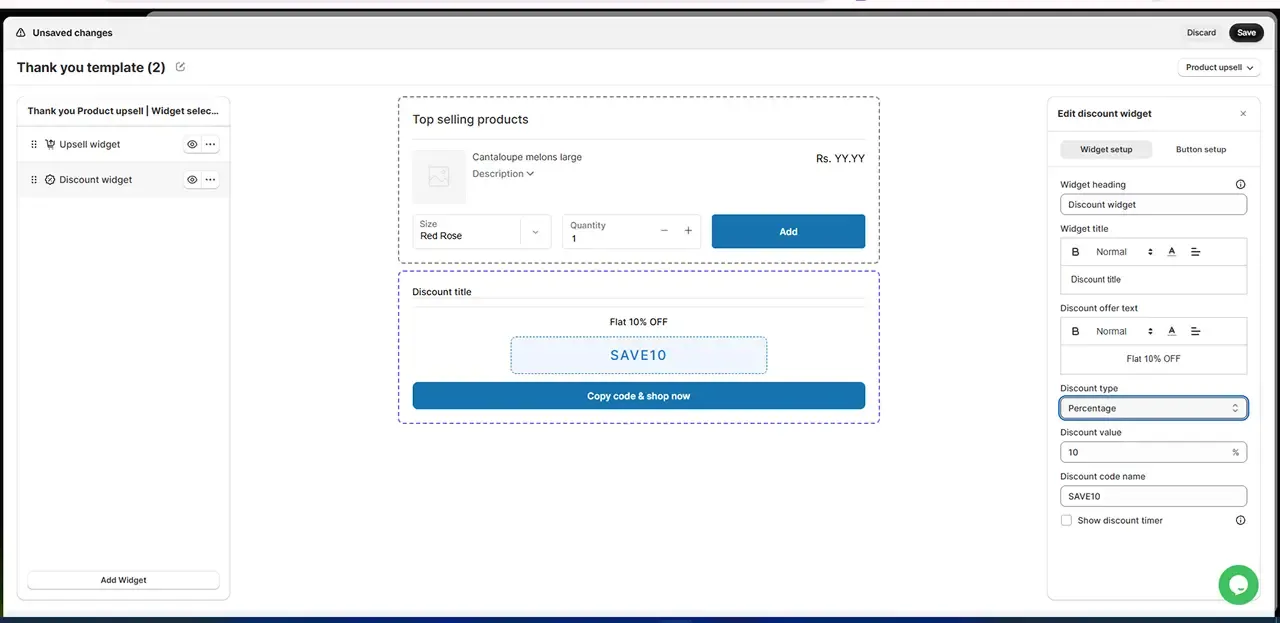
With SellMore: With SellMore: add a Discount widget to the Thank you page, choose Percentage or Fixed-amount, then set the value and a code name, such as 20% and NEXT20. Tick Show discount timer to add a countdown, so customers know the offer won't last.
3. Referral and Loyalty Rewards
Reward customers for telling friends, for example "Get $20 off when you refer a friend." Referral links come from a referral or loyalty app, so pair one with SellMore if referrals matter to you.
4. Delivery Tracking Details
Answer "When will it arrive?" before the customer asks. Shopify already shows order and shipping details. In Settings > Checkout, you can also tick Show a link for customers to track their order with Shop. Keep this near the top, above any offers.
5. A Personal Thank-You Message
Greet the customer by name. Bite uses the customer's name on its Thank you page, so the message feels written for them. Edit the text in Shopify's checkout editor and keep it in your brand's voice.
6. A Quick Post-Purchase Survey
Ask one or two questions while the purchase is fresh, such as "How did you hear about us?" A skincare store that asks about skin concerns learns which products to feature next.
With SellMore: add a Survey widget to your Thank you page or post-purchase page.
7. One Clear Call to Action
Point customers to one next step: follow you on Instagram, join your newsletter, or get a free guide. Pick one, not five, and add it with the checkout editor or your email app.
8. A Discount Code for the Next Order
For example: "Use code THANKYOU10 for 10% off your next order!"
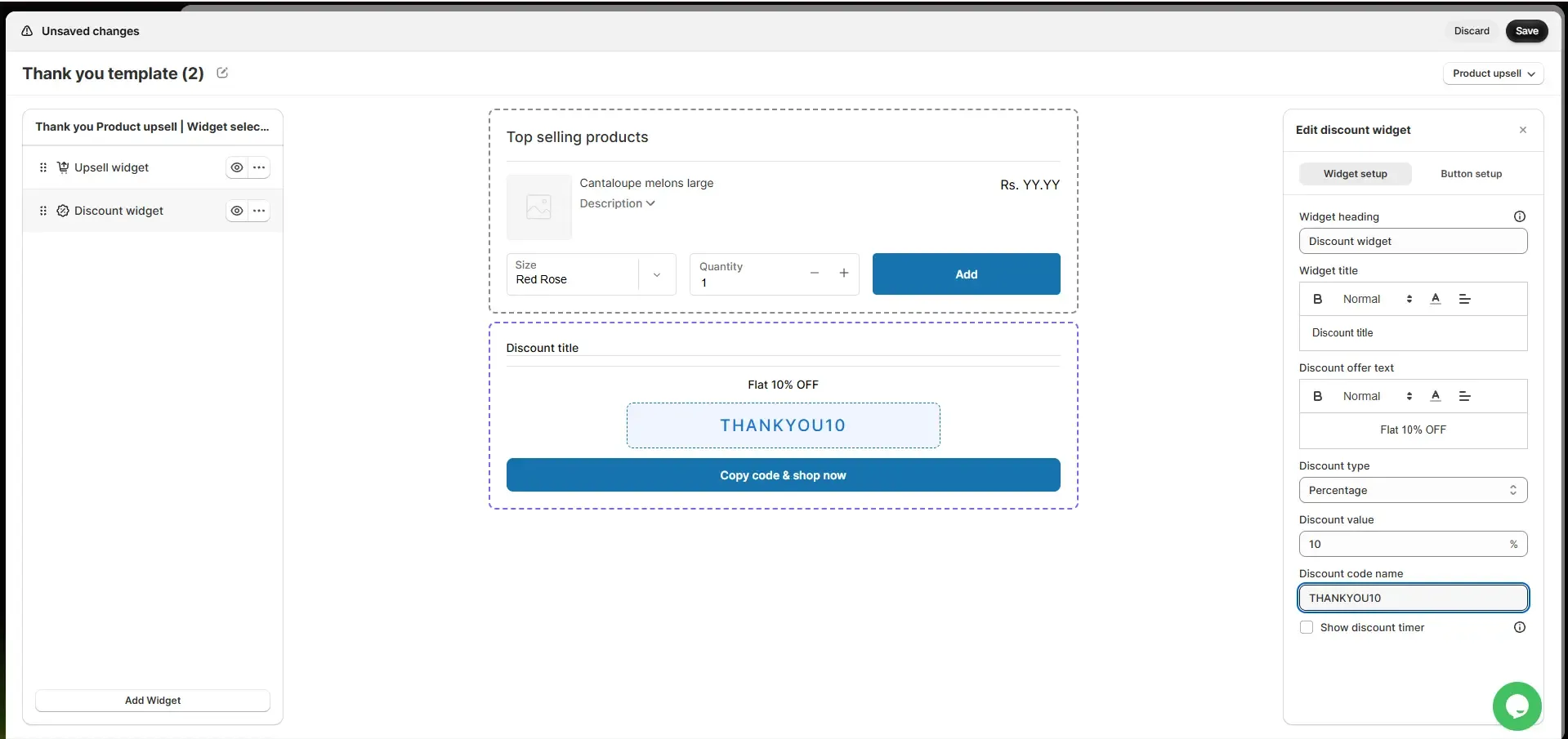
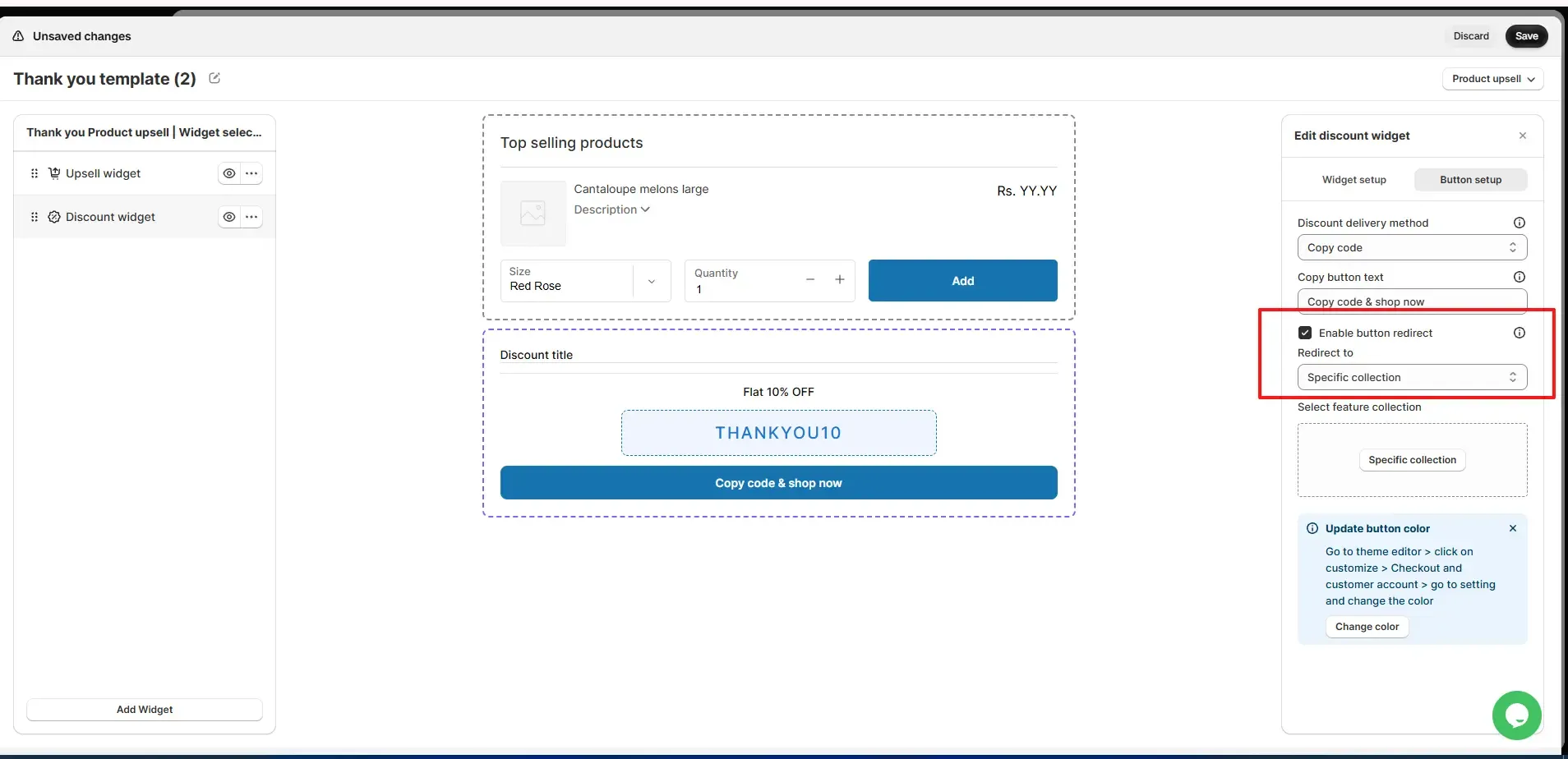
With SellMore: With SellMore: add a Discount widget to the Thank you or Order status page, choose Percentage or Fixed-amount, then set the value and code name, such as 10% and THANKYOU10. Customers copy the code with one click, and with Enable button redirect, the button takes them straight to a collection. You can also set the delivery method to Email, so customers enter their email to receive the code, and tick Delay email delivery so it arrives closer to reorder time.
9. Social Proof
Reviews reassure customers they chose well. Best Fitness shows customer reviews on its Thank you page.
With SellMore: add a Review widget, or tick Show star rating on your offer widgets. Connect your review app first. SellMore works with Judge.me, Ali Reviews, Yotpo, Loox, Junip, Stamped, and Rivyo.
10. Personalized Product Recommendations
Recommend products based on the order: socks, insoles, and a shoe-care kit after running shoes. This is the approach that earned BandsCo Straps most of its SellMore revenue.
With SellMore: add a Product recommendation to the Thank you or Order status page. Use AI recommendations or choose new arrivals, a collection, or specific products, and exclude anything you don't want suggested.
More Offers to Try Right After Checkout
These work especially well on the post-purchase page, where customers add them with one click:
Volume deals: offer more of the same product with SellMore's Fixed amount per item added discount. At $5 off per shirt, a customer who adds 3 saves $15.
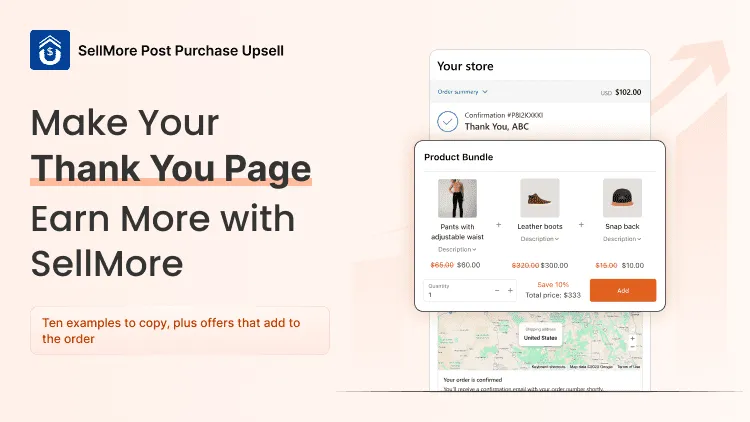
Bundles: show up to 3 products together with the Bundle widget, with the original price crossed out. A $90 grinder pairs well with beans, a scoop, and a brush.
Gift add-ons: offer $4 gift wrap in December, shown only on orders from your gift collection.
Digital add-ons: offer a "30-Day Workout Plan" after a fitness purchase. You'll need a digital downloads app to deliver the file.
The 7 Building Blocks of a High-Converting Thank You Page
Order confirmation and summary near the top.
A thank-you message using the customer's name and your brand's voice, as Magic Spoon does.
One clear next step.
A post-purchase offer, such as "Got our shampoo? Add the conditioner for 20% off."
A reason to share, such as "Refer a friend, you both get $10."
Social proof, like a short review.
Support contact in one line.
Match your brand's tone too: Death Wish Coffee jokes, Allbirds talks sustainability, and Quip stays clean and simple.
4 Thank You Page Layouts by Use Case
Avoid: leaving Shopify's default page untouched, stacking five calls to action, auto-redirecting, pop-ups, and asking for a review, referral, and survey all at once.
Why Some Offers Never Get Seen
Wallet and installment payments. Shopify doesn't show the post-purchase page for orders paid with Apple Pay, Google Pay, Klarna, Afterpay, or gift cards. A Thank you page offer covers these customers.
SellMore isn't your post-purchase app. In Settings > Checkout, under Post-purchase page, select SellMore Post Purchase Upsell.
The app is disabled. SellMore starts disabled after install, so click Enable on the Dashboard.
The Thank you slot isn't placed. Thank you and Order status offers need SellMore's app block added in Shopify's checkout editor.
The offer doesn't fit. In our experience, offers under a third of the order value get taken far more often than a second full-price hero product.
How to Add Offers to Your Shopify Thank You Page
Shopify's checkout editor: go to Settings > Checkout and click Edit next to your store's configuration to change branding and text and add app blocks. Shopify has retired the old code-based methods on this page, so guides that tell you to paste code no longer work. Developers can build custom checkout extensions instead.
With SellMore:
Install and set up. Choose Quick setup, Manual setup, or Guided setup with the SellMore team, then pick your pages.
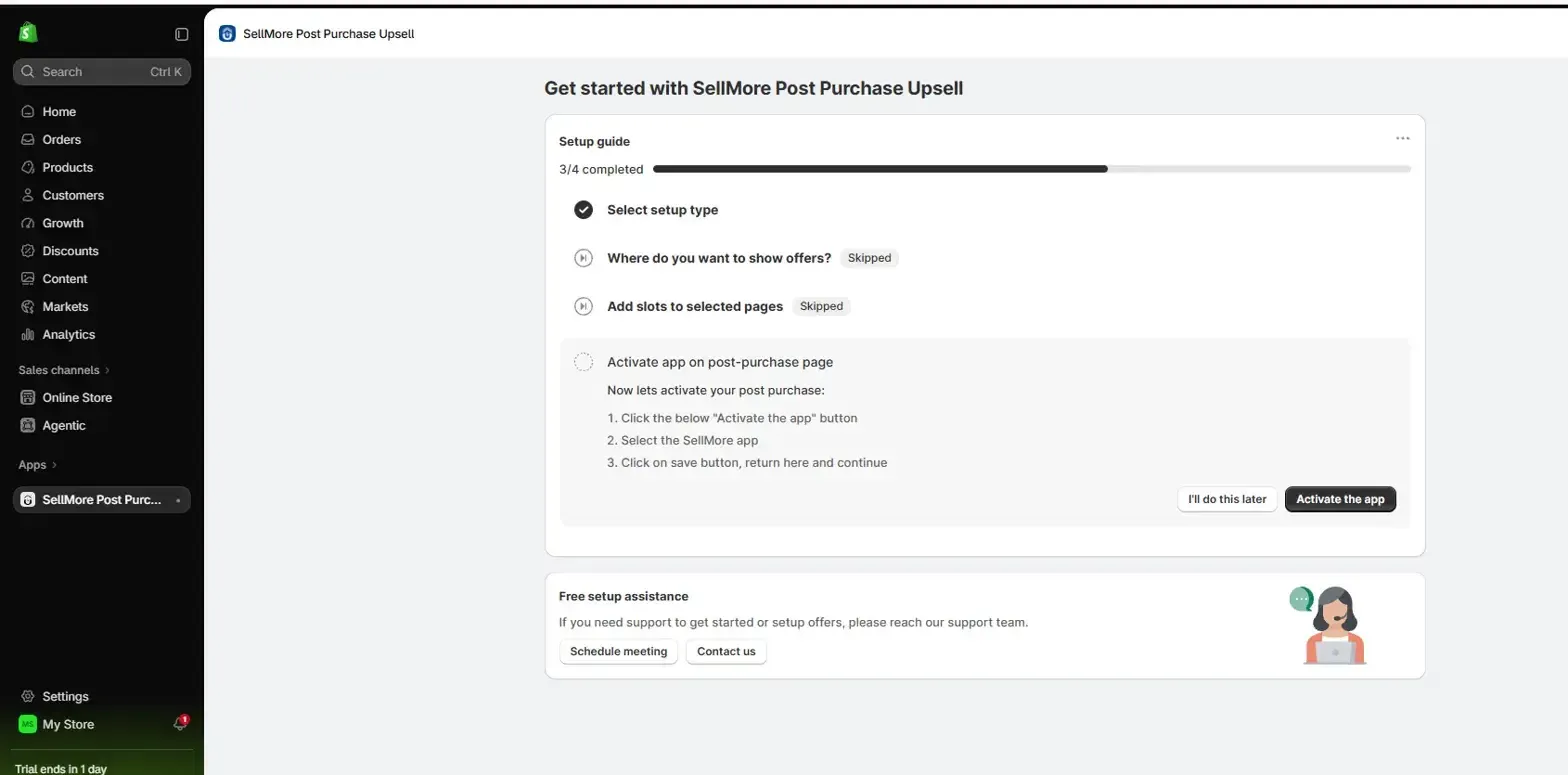
Make SellMore your post-purchase app. Click Activate the app, select SellMore Post Purchase Upsell in Shopify's checkout settings, click Save, then Verify setup and Enable app.
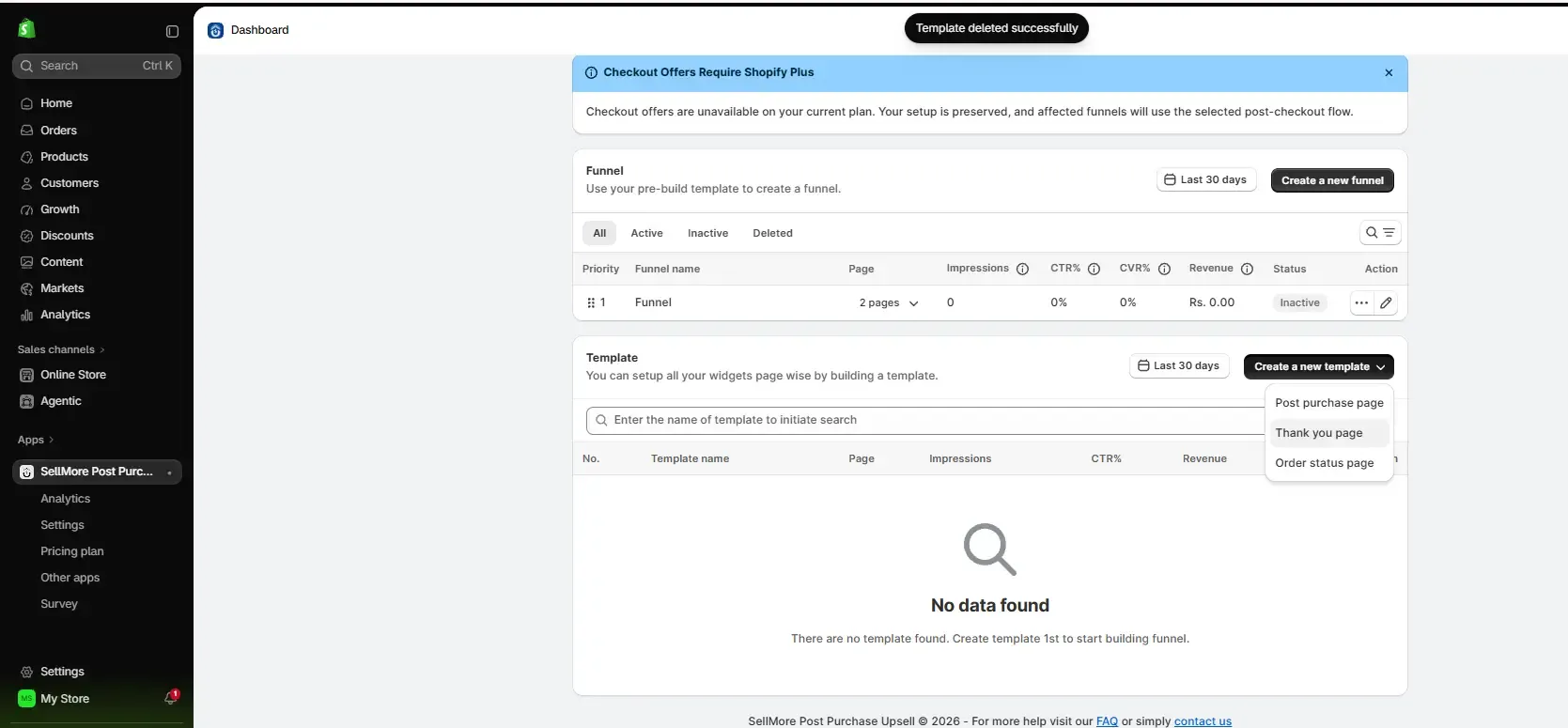
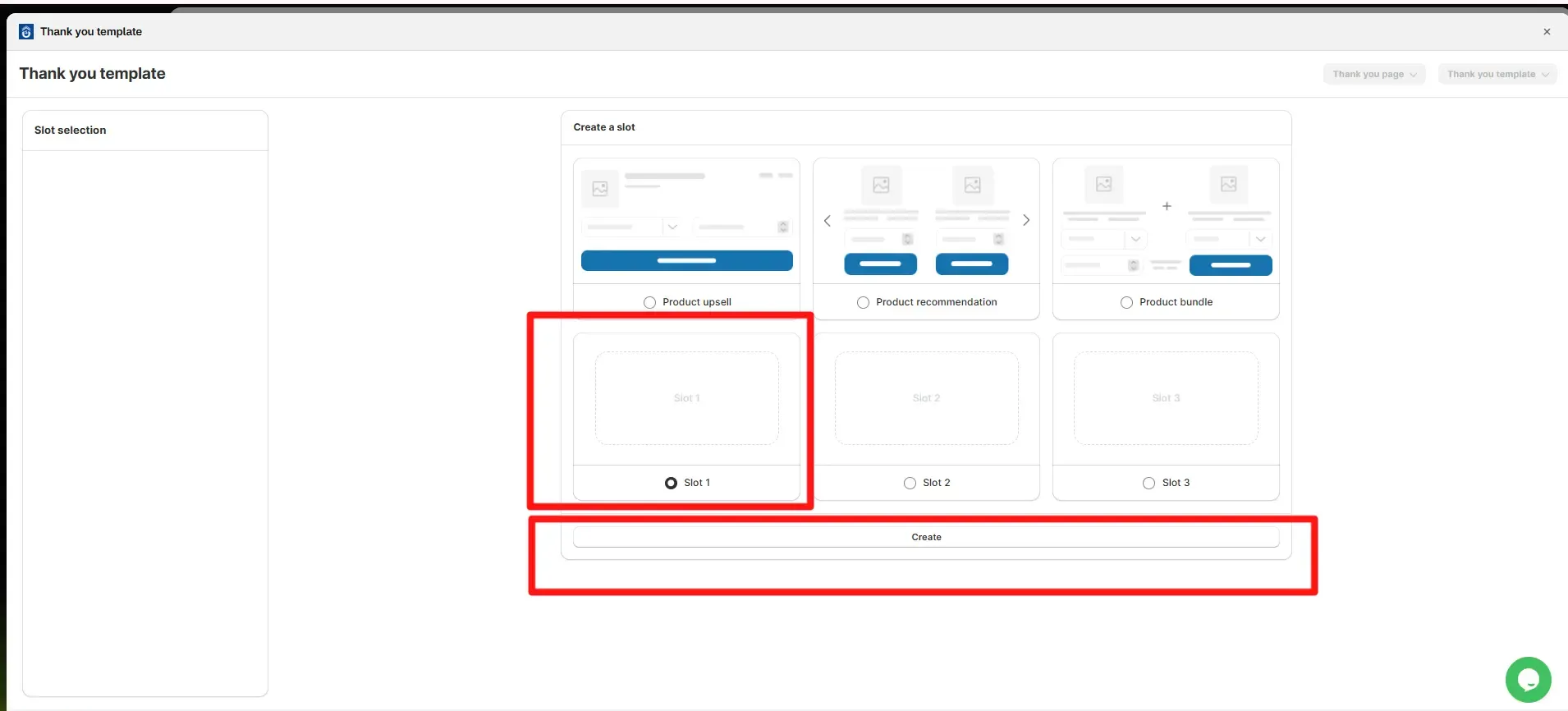
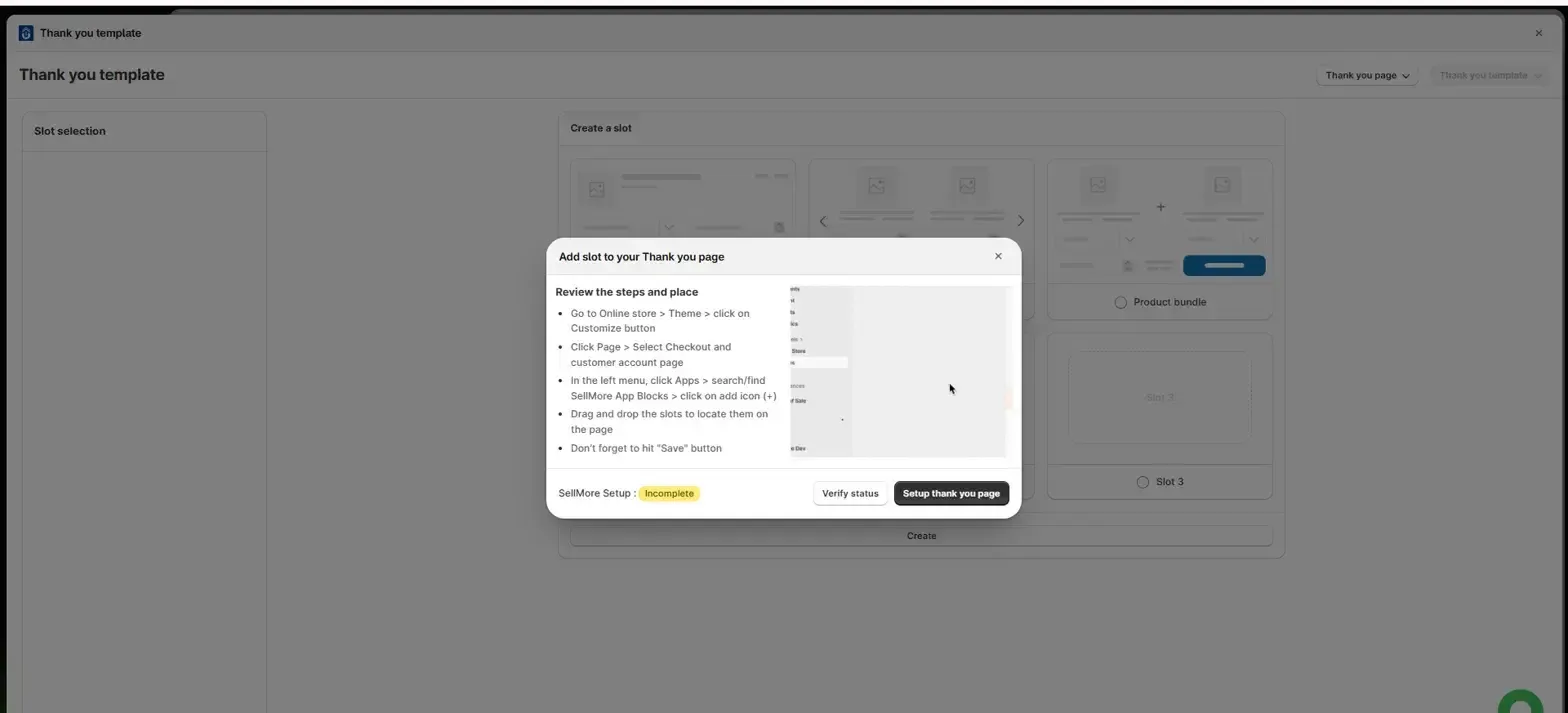
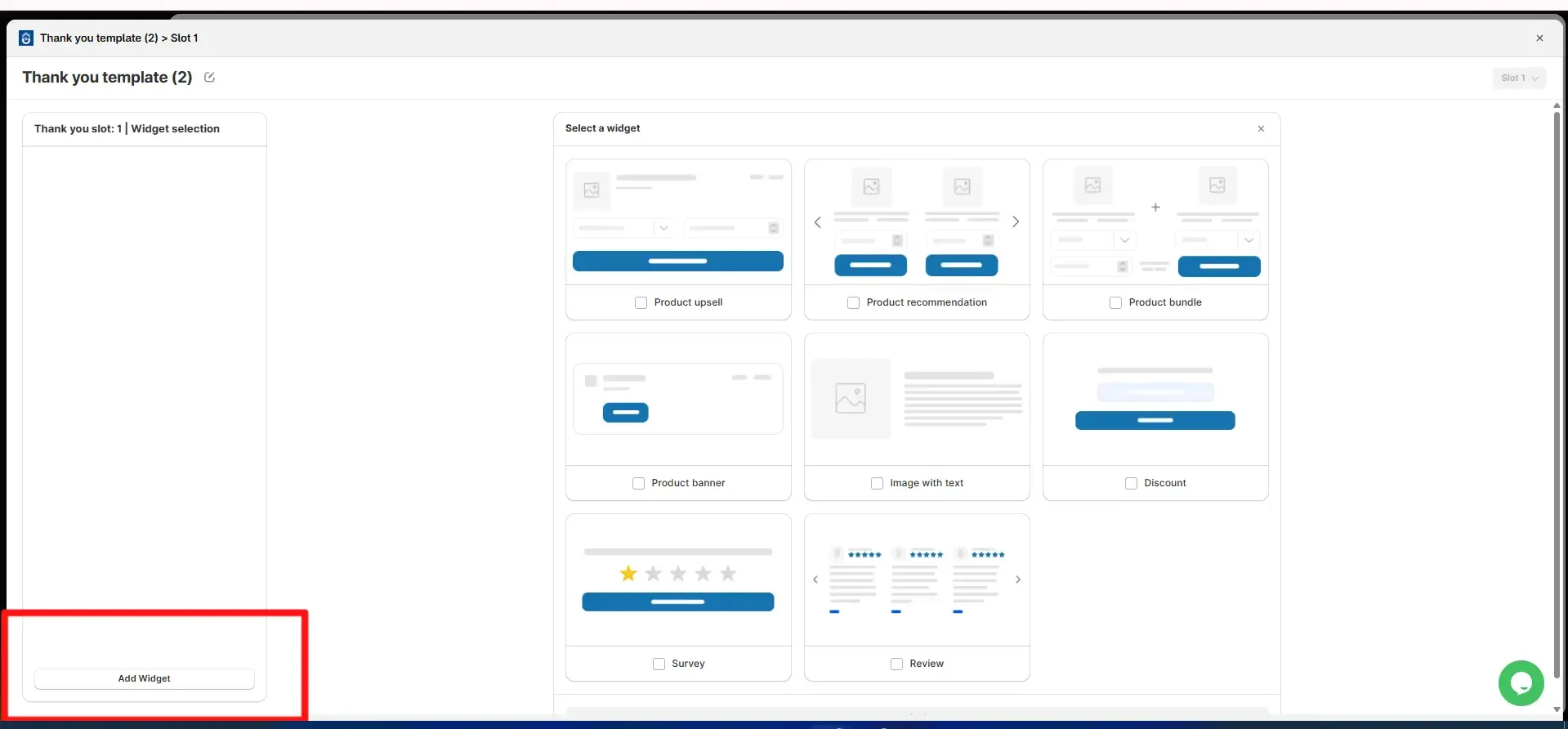
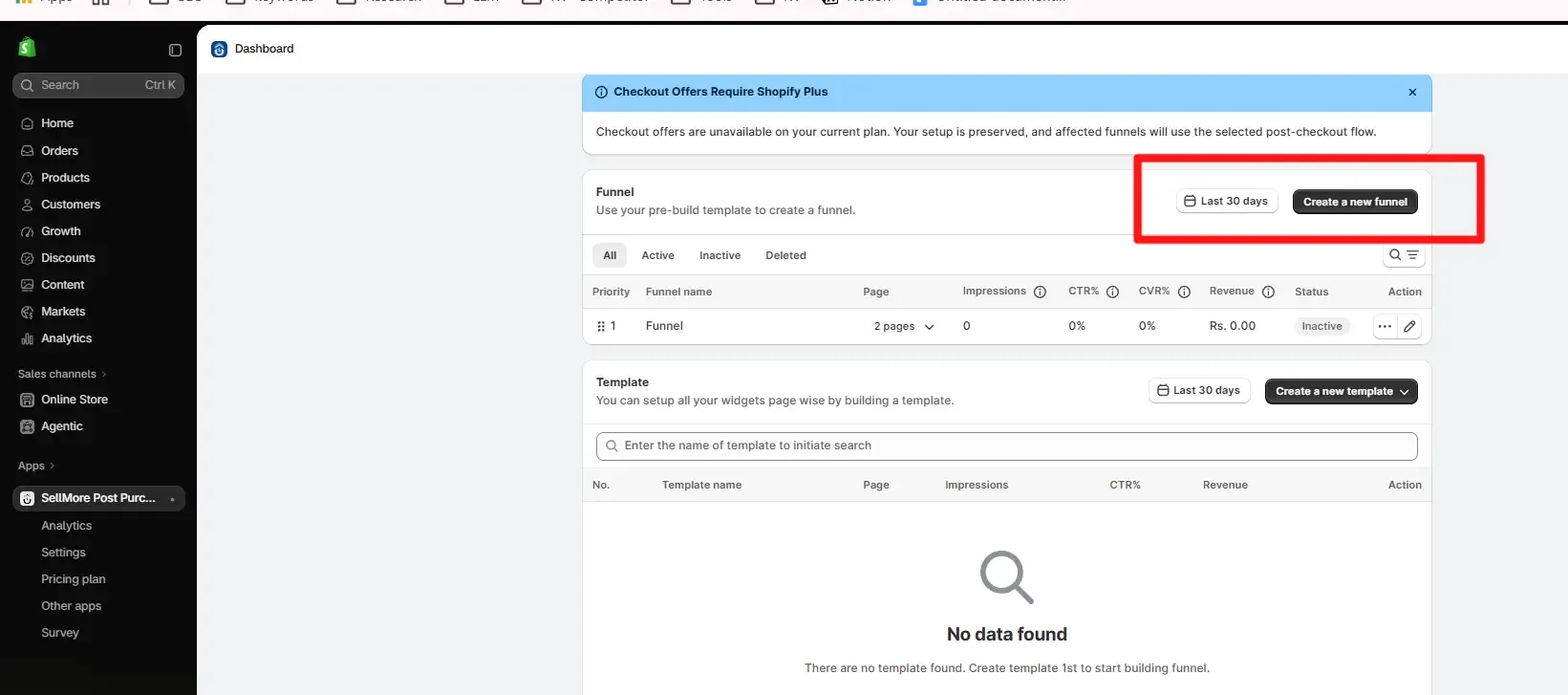 3. Build a Thank you page template. Go to Template > Create a new template > Thank you page, select a slot, and click Create. Click Setup thank you page, add the slot under Apps in Shopify's checkout editor, and click Save. Back in SellMore, click Verify status, then Add Widget to choose your offer. Each slot shows its own impressions, clicks, conversions, CVR%, and revenue, so you can see which offer earns the most.
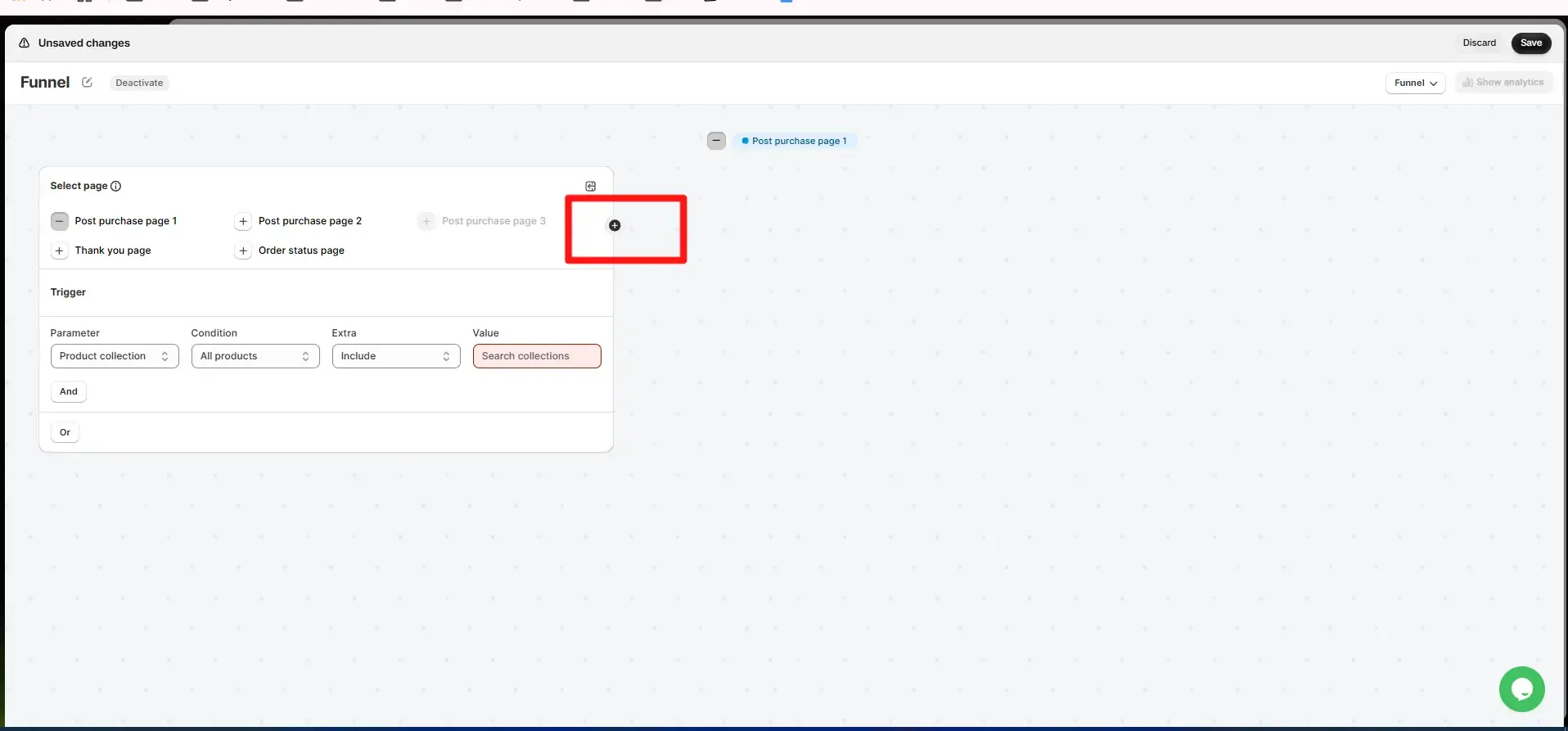
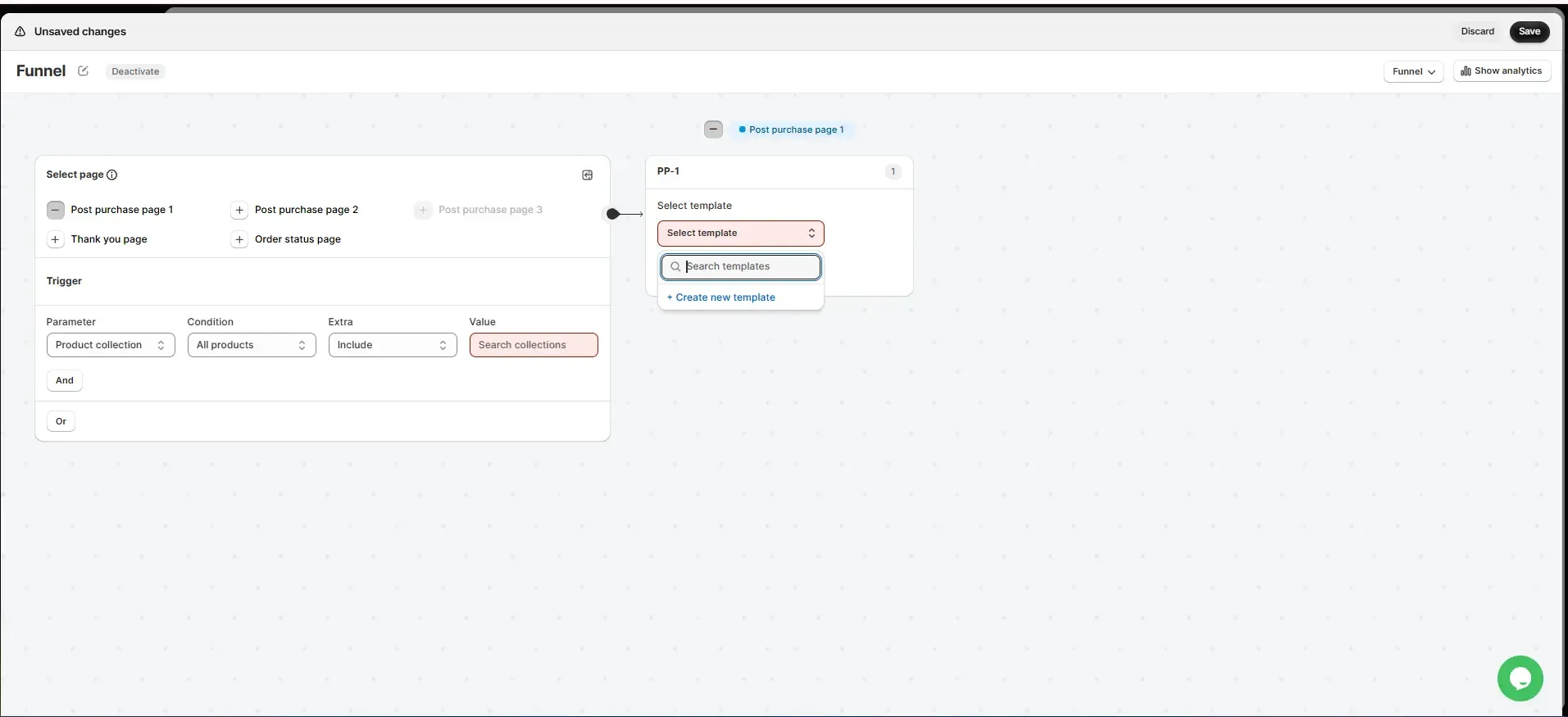
Create a funnel. Click Create a new funnel, keep the pages you want, and set a trigger, such as Product collection includes your shoe collection. Click the + on the right of the Select page card, then choose your template under Select template. You can also add a different next step for when the customer accepts or declines, using If accepted and If declined. Click Save.
Tips That Make Thank You Page Offers Convert
Start with one offer, then add more once you know what works. Shopify caps customers at three accepted post-purchase offers per checkout.
Match the offer to the order. SellMore's triggers include order value, item count, shipping location, product, SKU, collection, tag, and discount code. Choose upgrades and add-ons with care, because upsells and cross-sells suit different products.
Use only real deadlines. Fake urgency costs trust.
Track take rate and margin. If fewer than about 2% of customers accept, change the product or discount first. If you also run cross-sells before checkout, keep different products in each, since cross-sells and post-purchase upsells do different jobs.
Best Shopify Apps for Your Thank You Page
Ratings, reviews, and prices from the Shopify App Store as of October 7, 2026:
SellMore runs your post-purchase, Thank you, and Order status offers from one funnel builder, with every feature included on every plan and pricing based on order volume rather than a share of your upsell revenue.
Make Your Thank You Page Do More Than Say Thanks
One relevant offer, one clear next step, and a line of reassurance turn a confirmation page into revenue. If you sell consumables, start with a refill recommendation and a next-order code. If you sell gadgets, start with a 2-product accessory bundle.
With SellMore, you can add recommendations, upsells, bundles, and next-order discounts to your Thank you and Order status pages, without code. Every paid plan includes a 14-day free trial.
Add Your First Thank You Page Offer with SellMore